zinc:ui/kit — shadcn-style components
zinc:ui/kit is a small component kit written in Zinc (lib/std/kit), styled after shadcn/ui:
a light neutral theme (zinc greys, one indigo accent), Inter with tight tracking on titles, hairline borders, soft
shadows and 6–12 px radii. A dark theme uses the same roles. The kit is plain Zinc on top of zinc:ui: it compiles to
native code like the rest of the program and adds nothing at runtime beyond its nodes.
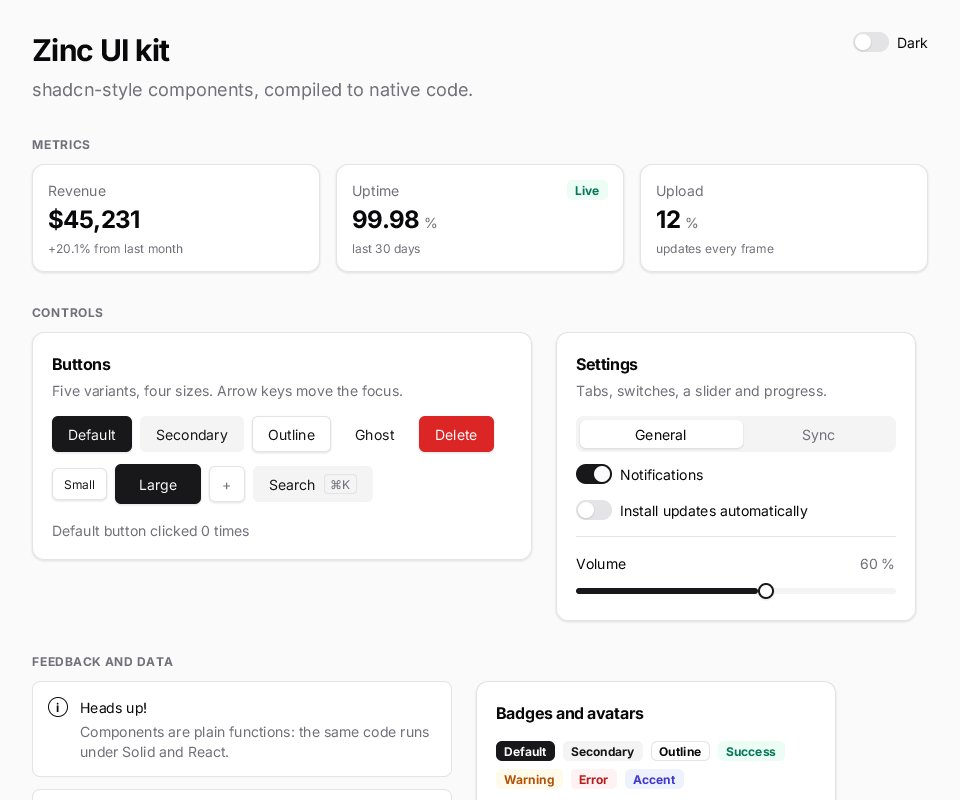
zinc run examples/ui/kit-gallery # every component on one page, with a light / dark switchAdaptive by default. On a phone or a Mac the kit takes the platform’s look from zinc:ui/platform: iOS’s 44 px buttons, 51 x 31 green
switches and type scale on iOS, Material 3’s rounded buttons and outlined switches on Android, macOS’s 24 px controls and the user’s accent
colour on a Mac; Linux, the web and the boards keep the look described here (neutral). An app with a theme of its own keeps its colours on the
platform’s shapes. "ui": {"platformLook": "neutral"} in zinc.json (or "ios", "android", "macos") forces one look everywhere;
ZINC_PLATFORM=ios zinc run examples/ui/kit-gallery shows another platform’s on the desktop (docs/ui.md, “Platform look”).
Using it
import { createSignal, render } from 'zinc:ui/solid';
import { Card, CardHeader, CardContent, CardFooter, Button, Switch, heading, mutedText } from 'zinc:ui/kit';

const [wifi, setWifi] = createSignal<boolean>(true);

function App(): i32 {
  return <View className="flex-col gap-6 p-8 h-full bg-zinc-50">
    <Text className={heading(1)}>Settings</Text>
    <Card className="w-96">
      <CardHeader title="Network" description="Wireless and wired connections." />
      <CardContent>
        <Switch checked={wifi} onChange={setWifi} label="Wi-Fi" />
        <Text className={mutedText()}>{wifi() ? 'Connected to zinc-lab' : 'Offline'}</Text>
      </CardContent>
      <CardFooter><Button label="Save" onClick={() => {}} /></CardFooter>
    </Card>
  </View>;
}

render(App, 0xfafafa, null);
Conventions, identical in both UI models:
- Components are functions returning nodes. Solid calls them once; React / Inferno re-run them on each render and reconcile their nodes like any other component.
- Text comes from props:
label,title,description,hint,trailing; the kit places and colours it. - Values that change are accessors:
value={() => temp()},checked={wifi},selected={tab}. Under Solid the component subscribes to them (only the affected node updates); under React writevalue={() => temp}, the accessor is read on every render. A plain prop that reads a signal (title={page()}) also follows it under Solid: the component is mounted again when the value changes (an accessor updates in place instead). childrenadds custom content (several children are passed as one fragment), andclassadds layout classes to the component’s outer node (grow,w-80,w-full).- An explicit import wins over the host tag of the same name:
import { Button } from 'zinc:ui/kit'makes<Button>the kit button in that file.
Components
| Component | Props | Notes |
|---|---|---|
Button | label?, variant? (default secondary outline ghost destructive), size? (sm default lg icon), onClick?, class?, children | children follow the label (an icon glyph, a Kbd) |
Card | class?, children | rounded-xl surface with a border and shadow-sm; spaces its sections |
CardHeader | title?, description?, children | |
CardTitle, CardDescription | text | when composing a header by hand |
CardContent, CardFooter | class?, children | column / row, padded like the header |
Badge | label, variant? (default secondary outline destructive success warning accent), class? | |
Separator | vertical?, class? | one-pixel hairline |
Stat | label, value: () => string, unit?, hint?, class?, children | metric tile; children sit on the label row (a Badge) |
Tabs | items: string[], selected: () => i32, onSelect, class? | segmented control; switch the panels yourself: {tab() === 0 ? <A/> : <B/>} |
Switch | checked: () => boolean, onChange, label? | never flips itself: onChange decides |
Progress | value: () => number (0–100), accent?, class? | |
Slider | value: () => number, onChange, min?, max?, step?, class? | tap the rail or drag sideways to set the value (never at the press: a swipe over it scrolls); keeps horizontal drags inside scroll views (grab="keep-x") |
Avatar | name, size? (sm default lg) | initials of the first two words |
Alert | title, description?, variant? (default destructive success), icon?, class? | |
List | class?, children | bordered panel of rows |
ListItem | title, description?, trailing?, selected?: () => boolean, onClick?, leading?: () => node, children | rows with onClick are focusable and highlight when pressed |
Kbd | label | key or shortcut hint |
Overlays
Built on the engine’s layers, anchoring, focus scopes and dismiss stack (ui.md): they paint above the page and outside any clipping, follow their button and flip when there is no room, and Escape or a press outside closes the latest one.
ui.bindKeys('mod-s', 'save'); ui.onAction(-1, 'save', save);
<Tooltip label="Save" action="save"><Button label="Save" onClick={save} /></Tooltip>          // hint: Save ⌘S
<DropdownMenu label="Edit" items={[{ label: 'Save', action: 'save' }, { label: 'Delete', onSelect: remove }]} />
<Popover label="Filters"><Switch checked={f} onChange={setF} label="Only mine" /></Popover>
<Dialog open={asking} onOpenChange={setAsking} title="Delete?" footer={() => <Button label="Delete" onClick={del} />} />
toast('Saved', 'All changes are on disk.');| Component | Props | Notes |
|---|---|---|
Tooltip | label, action? (its shortcut is shown), placement? (top default), delay? (500 ms), class?, children | shows while the pointer rests on the children |
Popover | label (the trigger button), variant?, placement? (bottom-start), class? (the panel), children | focus moves into the panel and comes back when it closes |
DropdownMenu | label, items: MenuItem[] (label, action?, onSelect?, disabled?), variant?, placement?, class? | opens focused on its first item; arrows move (trapped), Enter picks; actions show their shortcut (keyLabel) |
Dialog | open: () => boolean, onOpenChange, title?, description?, class?, children, footer? | modal, dims the page (the dim fades, the panel fades and grows from 96%, both ways), traps the focus, focuses its first control, gives the focus back |
toast(title, description?, ms?) | a stack in the bottom-right corner, 4 s by default; no component to mount |
Tooltip, Popover and DropdownMenu keep their open state in the engine (the panel’s hidden), so they work the same in
both models; under React a re-render of their parent closes them. Dialog is controlled, like Switch.
Keyboard (on-screen, touch devices)
<Input value={name()} onInput={setName} />
<Input inputMode="numeric" value={pin()} onInput={setPin} />      {/* digit pad; also decimal, tel, email, url, search */}
<Keyboard layouts={['fr', 'en', 'de']} />                          {/* at the bottom of the screen's column */}
Keyboard slides in while a text field has the focus (mode="always" keeps it on screen) and types through the
real keyboard path (ui.insertText / ui.sendKey), so onInput, undo, selection and Enter behave as with a
physical keyboard; pressing a key never takes the focus (keepFocus). A bubble previews the pressed key, a long
press offers accents (slide onto one, release), backspace repeats while held, shift is one-shot and a double tap
locks capitals, the language key cycles layouts, ⌄ closes it.
| prop | |
|---|---|
layouts | layout ids, cycled by the language key: en fr de es it pt sv ru el built in; registerLayout(new KeyboardLayout(...)) adds yours (rows as strings, {shift:1.5}-style special keys, accents, localized Enter / search / done captions) |
mode | auto (default) or always |
onKey | every key: a character, Backspace, Enter, Shift, Layout:<id>, Hide (works without a focused field, e.g. a custom display) |
keyHeight, gap | sizes (default 44 / 6 px) |
class, keyClass, specialKeyClass, accentClass | restyle the panel, letter keys, special keys and the accent popup |
preview | key bubble (default true) |
Engine hooks for your own keyboards: ui.insertText(s), ui.sendKey(key, mods), ui.focusedField(),
ui.fieldMode(h), ui.onFocusChange(f), and the keepFocus attribute. Example: zinc run examples/ui/keyboard.
Typography helpers return class strings for host <Text> nodes in the current theme:
heading(1..4), leadText(), bodyText(), smallText(), mutedText(), captionText(), overline().
<Text className={heading(2)}>Devices</Text>
<Text className={mutedText()}>{count()} online</Text>
Themes
LIGHT (default) and DARK name a Tailwind colour for each role of shadcn’s CSS variables: background,
foreground, card, muted, mutedForeground, border, primary, secondary, accent, destructive,
success… setTheme(DARK) switches every mounted kit component (the theme is a signal); under React the new
theme applies on the next render. Your own nodes can use the same tokens:
<View className={`h-full bg-${theme().background}`}>...</View>A custom theme is a Theme object: copy LIGHT, change the colours (e.g. accent: 'emerald-600'), setTheme it.
How it works
Each kit file starts with /** @jsxHelpers ./host */: the JSX compiler lowers that file against
lib/std/kit/host.ts instead of the Solid or React helpers. The host helpers ask whether the React engine is
rendering the program: under Solid, dynamic classes and texts become fine-grained effects; under React they are read
once per render and the nodes come from the reconciler. tests/conformance/kit_solid.tsx and kit_react.tsx build
the same screen in both models and must print the same layout (on the sim and on every native target).
Limits
- No hover (touch screens and pads have none): pressed and focused states use
active:andfocus:fills, and every pressable also dims while it is held (zinc:ui’s pressed feedback, docs/ui.md;active:opacity-*orpressFeedback={0}replaces it). Focusable kit nodes always set afocus:fill, which also replaces the yellow keyboard-focus ring ofzinc:ui. - Two weights are baked (Inter Regular and Bold):
font-mediumrenders regular,font-semiboldbold. - The kit’s text sizes are baked into every program that imports it (seven sizes, regular and bold).